---
Ever noticed your proxy server setting the *X-Forwarded-For* header? What does that mean, and should you be worried if that’s the case? (Spoiler: yes, you probably should!)
Let me explain what this header represents, how it works, who sets it, and why it can be a problem for web scraping and automation scripts.
> [](https://visit.decodo.com/09547M)
>
> *Before proceeding, let me thank **Decodo**, the platinum partner of the month, and their Scraping API.*
>
> Scraping made simple - **try Decodo’s All-In-One Scraping API free for 7 days**.
>
> [Start Scraping Now](https://visit.decodo.com/09547M)
>
> ---
## What Is the X-Forwarded-For Header?
*[X-Forwarded-For](https://developer.mozilla.org/en-US/docs/Web/HTTP/Reference/Headers/X-Forwarded-For)* is an HTTP header used to identify the original IP address of a client connecting to a web server through a proxy, load balancer, or any other intermediary.
**Note**: Like most *X-\** headers, *X-Forwarded-For* is non-standard. However, over the years, it has become the *de facto* standard because it’s far more popular than the equivalent [standard Forwarded header](https://developer.mozilla.org/en-US/docs/Web/HTTP/Reference/Headers/Forwarded).
X-Forwarded-For is mainly used to determine the originating IP address of a client [passing through one or more proxies](https://substack.thewebscraping.club/p/whats-a-proxy-server). Its syntax in an HTTP request is:
`X-Forwarded-For: <client_IP>, [<proxy1_IP>, <proxy2_IP>, ..., <proxyN_IP>]`
Where:
- *<client\_IP>* is the IP address of the client from which the request originates.
- *<proxy1\_IP>, ..., <proxyN\_IP>* are optional proxy IP addresses. When multiple proxies are involved in the routing of the request from the client to the target server, the leftmost proxy IP is the IP of the first server in the [proxy chain](https://substack.thewebscraping.club/p/bypass-akamai-bot-protection), while the rightmost IP corresponds to the most recent proxy server.
---
> This episode is brought to you by our Gold Partners. Be sure to have a look **[at the Club Deals page](https://substack.thewebscraping.club/p/special-offers-for-our-readers)** to discover their generous offers available for the TWSC readers.
>
> [](https://substack.thewebscraping.club/i/158107914/netnut-offer-for-unstoppable-scraping)
>
> **💰 -** ***[1 TB of web unblocker](https://netnut.io/unblocker/?utm_medium=referral&utm_source=twsc&utm_campaign=partners#pricing)** [for free at this link](https://netnut.io/unblocker/?utm_medium=referral&utm_source=twsc&utm_campaign=partners#pricing)*
>
> [](https://oxylabs.go2cloud.org/aff_c?offer_id=7&aff_id=665&url_id=152)
>
> **💰 - [50% Off Residential Proxies](https://oxylabs.go2cloud.org/aff_c?offer_id=7&aff_id=665&url_id=152)**
>
> [](https://substackcdn.com/image/fetch/$s_!cMCv!,f_auto,q_auto:good,fl_progressive:steep/https%3A%2F%2Fsubstack-post-media.s3.amazonaws.com%2Fpublic%2Fimages%2Ffcc4621b-d173-4d25-a896-9a358b03971d_1200x244.png)
>
> **💰 - [Use TWSC for 15% OFF | $1.75/GB Residential Bandwidth | ISP Proxies in 15+ Countries](https://dashboard.pingproxies.com/sign-up?utm_source=twsc&utm_medium=banner_one&utm_id=twsc)**
---
### X-Forwarded-For vs Forwarded HTTP Header
[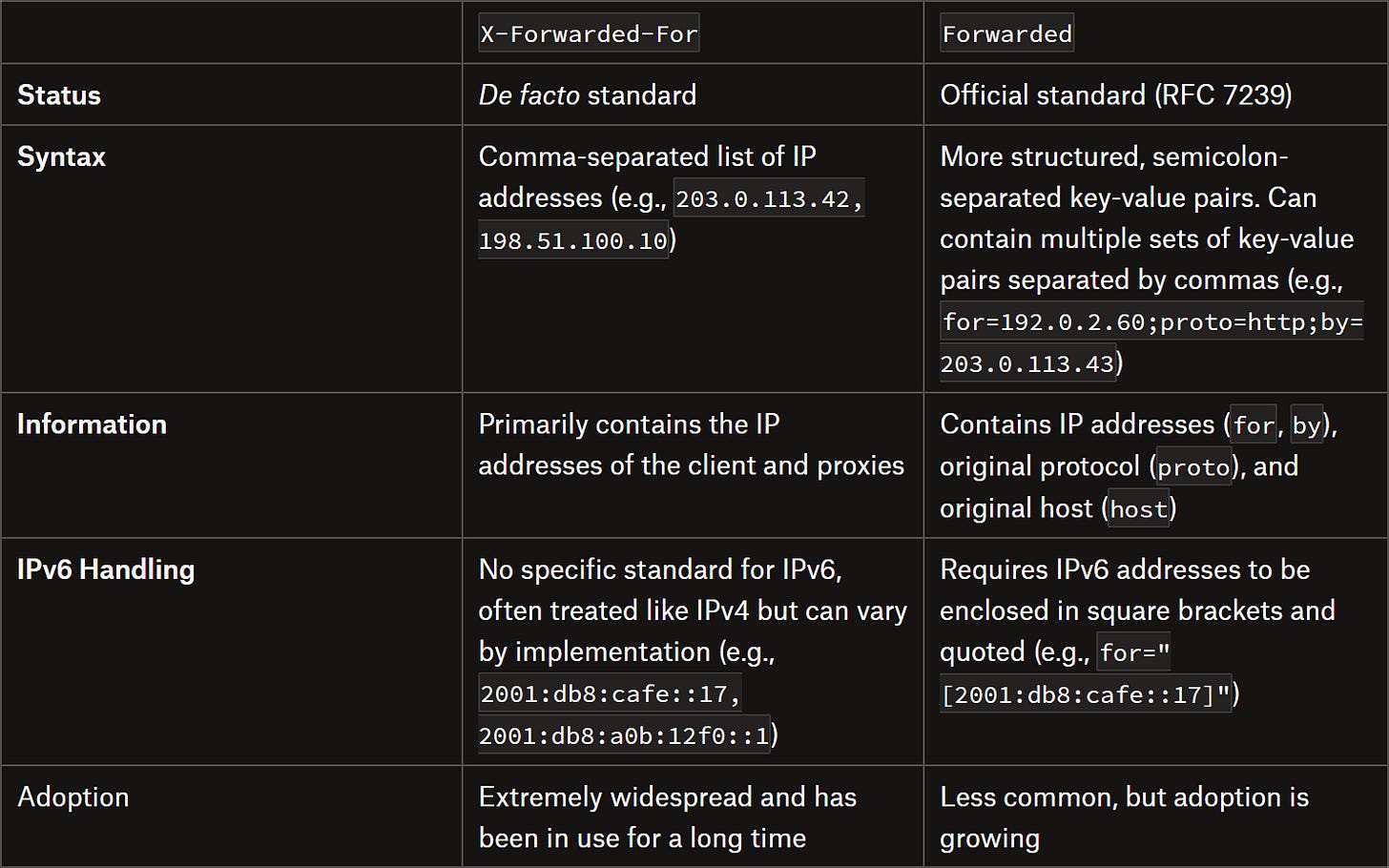](https://substackcdn.com/image/fetch/$s_!lv61!,f_auto,q_auto:good,fl_progressive:steep/https%3A%2F%2Fsubstack-post-media.s3.amazonaws.com%2Fpublic%2Fimages%2F7f04d452-3851-4336-a2da-7b725a8acb54_1490x931.png)
X-Forwarded-For vs Forwarded HTTP header table
**Note**: From this point on, I’ll refer specifically to the *X-Forwarded-For* header, but everything discussed also applies to the standard *Forwarded* header.
## Common Applications of the X-Forwarded-For Header
As I mentioned earlier, the *X-Forwarded-For* header is commonly set by intermediaries while routing a request to the next node, as with:
- **Transparent proxies**: To preserve the client IP when forwarding requests to target servers.
- **Reverse proxies**: To identify the original client IP while hiding backend server details. Find out more about [how reverse proxies work](https://substack.thewebscraping.club/p/reverse-proxies-and-webscraping).
- **Load balancers**: To track the client IP across multiple backend servers, ensuring consistent session handling, logging, and rate limiting.
- **CDNs and caching layers**: To maintain client origin information for analytics, geolocation, security filtering, and other scenarios.
Now, let me show you a realistic scenario to better understand how this mechanism works. Assume a client (IP: *203.0.113.5*) sends a request through a transparent proxy (IP: *45.79.23.10*) for a target server. This is intercepted by a load balancer (IP: *198.51.100.42*), which routes it to the final server.
When receiving the request from the client, the transparent proxy adds the *X-Forwarded-For* header and sets the client's IP as the first value:
```
X-Forwarded-For: 203.0.113.5
```
The request is then sent to the next hop. The load balancer receives the request, sees the *X-Forwarded-For* header, and appends the IP of the previous hop (the proxy's IP) to the list:
```
X-Forwarded-For: 203.0.113.5, 45.79.23.10
```
Next, it sends the request to the final server. Finally, the server receives the request that was produced by the client.
The server can now determine that the request comes from the client IP *203.0.113.5* and passed through the *45.79.23.10* node (and *198.51.100.42*, which represents the immediate sender’s packet IP) before reaching it.
---
*Before continuing with the article, I wanted to let you know that I've started my community in Circle. It’s a place where we can share our experiences and knowledge, and it’s included in your subscription. **[Enter the TWSC community at this link](https://community.thewebscraping.club/join?invitation_token=b1b18fca3853079d6560dc6e7cd385d571bed419-da499d8e-ff74-48bc-bc8a-1e6e65514f7b)**.*
[Join the community](https://community.thewebscraping.club/join?invitation_token=b1b18fca3853079d6560dc6e7cd385d571bed419-da499d8e-ff74-48bc-bc8a-1e6e65514f7b)
---
## The X-Forwarded-For Header in Proxy Traffic Forwarding
Now, this all sounds cool, but why does it actually matter for web scraping? And why should you even care about the existence of the *X-Forwarded-For* header in the first place? The answer is simple: **you don’t want your real IP to be exposed to the target server if you’re routing requests through a proxy!**
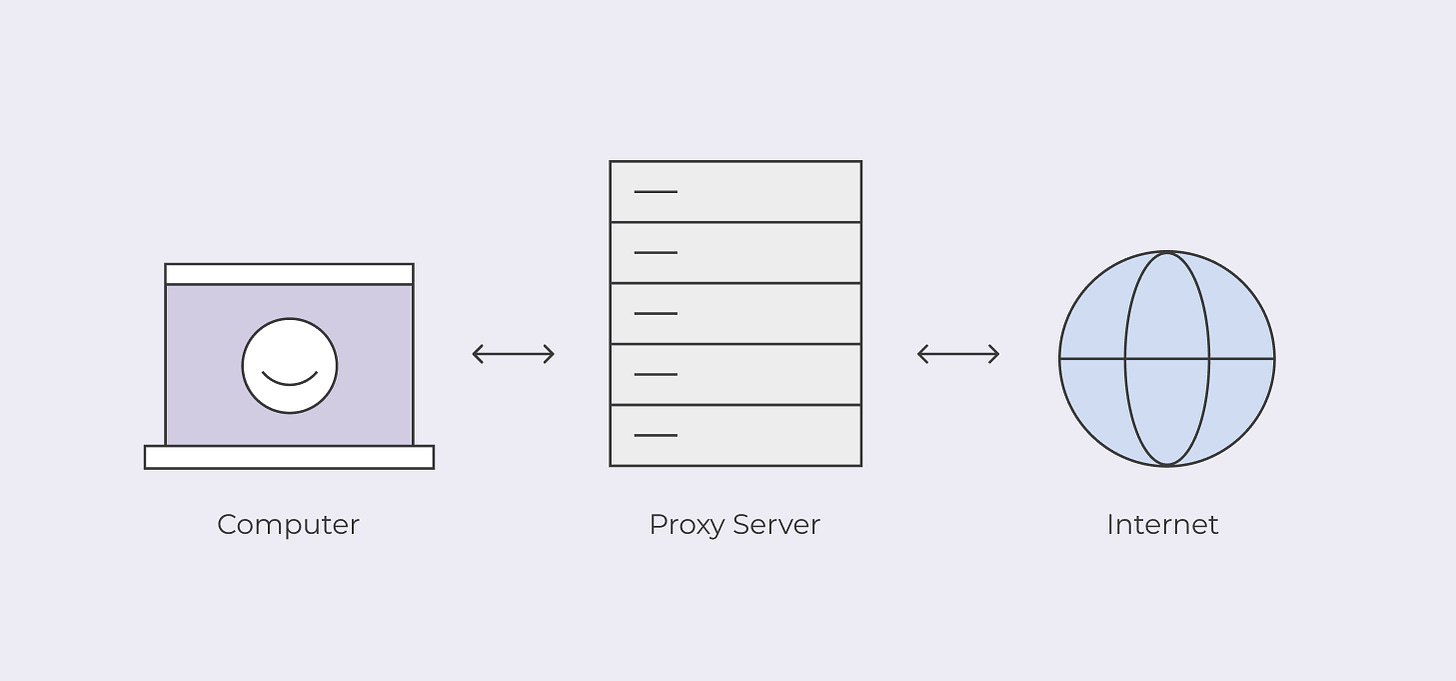
The whole point of using proxies is to hide your identity (i.e., your IP address) behind theirs.
[](https://substackcdn.com/image/fetch/$s_!y2Aj!,f_auto,q_auto:good,fl_progressive:steep/https%3A%2F%2Fsubstack-post-media.s3.amazonaws.com%2Fpublic%2Fimages%2F5857e34d-4830-4cb1-a8e7-64dfc68baf89_1457x681.png)
The proxy mechanism
If the proxy you’re using is too transparent and adds your IP to the *X-Forwarded-For* (or *Forwarded*) header, the target server can easily figure out where the request actually came from. That means it can apply rate limiting, track your activity, enforce geo-restrictions, and so on. In other words, you lose all the [benefits of routing requests through a proxy](https://substack.thewebscraping.club/p/everything-about-proxies)!
So, what kinds of proxies actually set the *X-Forwarded-For* header? There’s no hard rule, but it generally happens with:
- Test proxies used for debugging or monitoring.
- Free public proxies (and there’s a reason they’re free).
- Overly “ethical” or corporate proxies, which include client IPs for logging or compliance.
**Pro tip**: Let me share my experience with free proxy servers. Remember, if something is free, *you are the product*. Be careful routing your traffic through free proxies, especially if you don’t want your personal IP attached. Maintaining a proxy network costs money, so if a website promises free proxies, make sure you understand their business model before trusting them with your requests.
### **Types of Proxies**
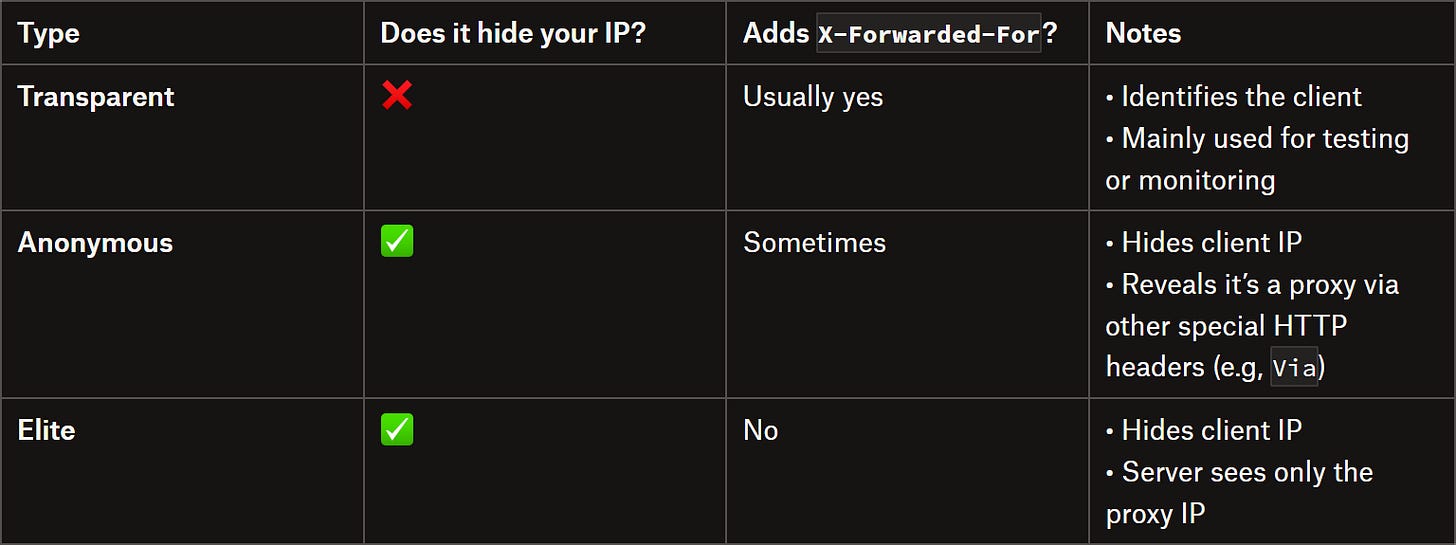
As a reminder, in the industry, proxies are generally classified like this:
[](https://substackcdn.com/image/fetch/$s_!3DhZ!,f_auto,q_auto:good,fl_progressive:steep/https%3A%2F%2Fsubstack-post-media.s3.amazonaws.com%2Fpublic%2Fimages%2Fbf3eb83a-7b6b-494f-9187-a40d0fd47c8f_1536x575.png)
Comparing proxy types
Basically, for web scraping or automation scripts, you want to use elite proxies, which is what all premium proxy providers sell.
---
[Check the TWSC YouTube Channel](https://www.youtube.com/@thewebscrapingclub)
---
## How to Make Sure Your Proxies Do Not Send the X-Forwarded-For Header
Follow me as I’ll show you how to verify whether your proxy server sets the *X-Forwarded-For* header through a simple Python script. You’ll also see how the same script behaves when using a transparent proxy versus an elite proxy.
### **Testing a Proxy for Anonymity**
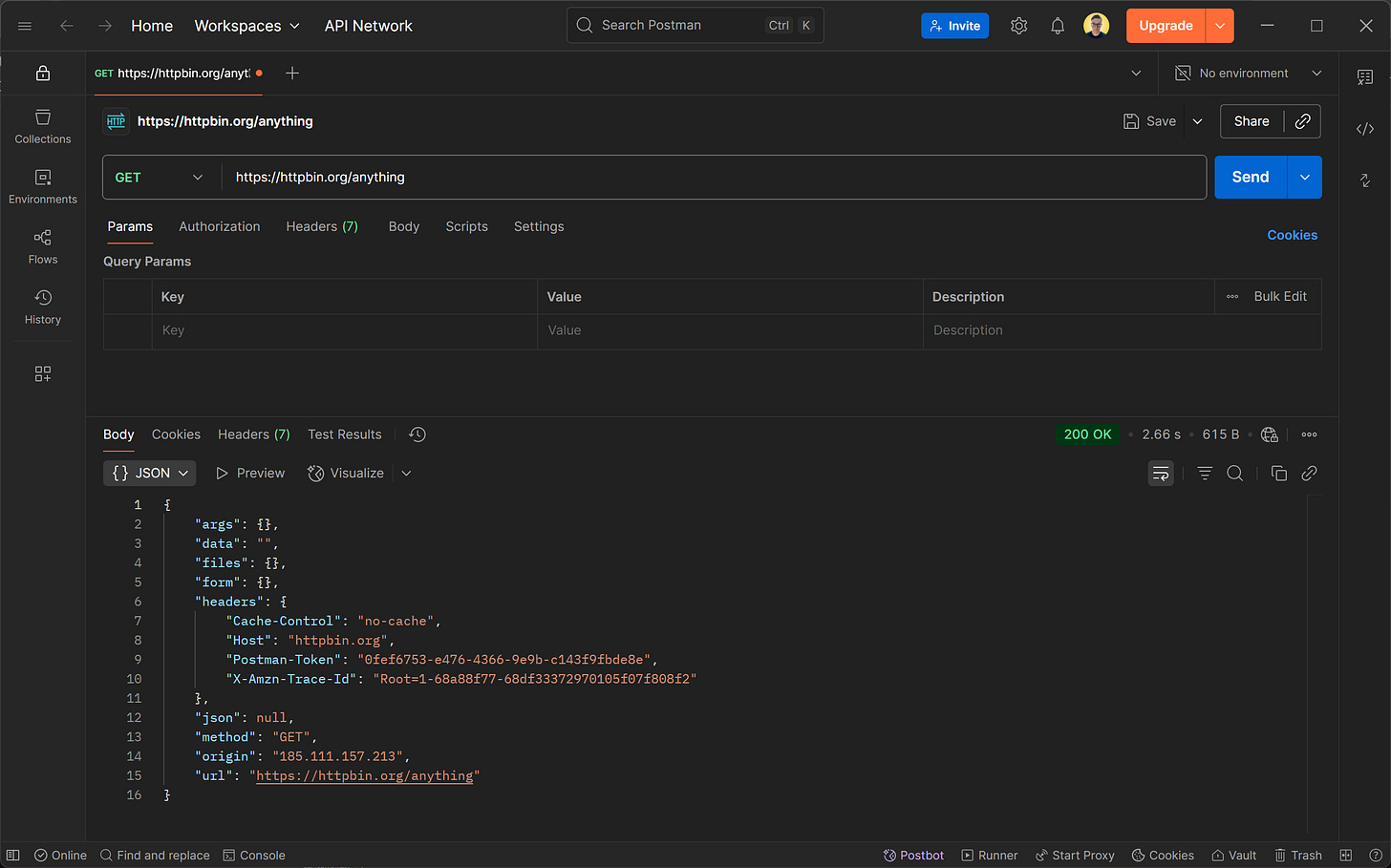
If you suspect the proxy server you are routing your requests through isn’t actually hiding your identity, you can run a simple test: send a request to the *[GET /anything](https://httpbin.org/anything)* [endpoint of the HttpBin project](https://httpbin.org/anything).
[](https://substackcdn.com/image/fetch/$s_!ijAH!,f_auto,q_auto:good,fl_progressive:steep/https%3A%2F%2Fsubstack-post-media.s3.amazonaws.com%2Fpublic%2Fimages%2Fe61ed4ff-6532-4ceb-a236-3b8fe50d2515_2588x1616.png)
The response returned by the http.io/anything GET endpoint
As you can tell, this endpoint returns all the information your client sent in the HTTP request. In detail, you can check the IP seen by the target server (in the *origin* field) as well as the presence of the *X-Forwarded-For* header.
Below is a simple Python script that routes a request through your proxy server to the */anything* endpoint and exports the response as a JSON file:
```
# pip install requests
import requests
import json
# The URL of your proxy server
proxy = "http[s]://[<USERNAME>:<PASSWORD>@]<PROXY_IP>:<PROXY_PORT>" # Replace with your proxy
# Set up the proxy dictionary
proxies = {
"http": proxy,
"https": proxy
}
# Send a request to the HttpBin /anything endpoint
response = requests.get("https://httpbin.io/anything", proxies=proxies)
# Parse the response as JSON
data = response.json()
# Export the JSON response to a file
with open("proxy_test_response.json", "w") as f:
json.dump(data, f, indent=4)
```
Wonderful! You’re now ready to test your proxy IP against anonymity checks.
### **Testing a Transparent Proxy**
Assume this is the URL of a proxy you got for free from a sketchy site:
```
http://45.79.23.10:8080
```
Set that in the *proxy* variable in the script above:
```
proxy = "http://45.79.23.10:8080"
```
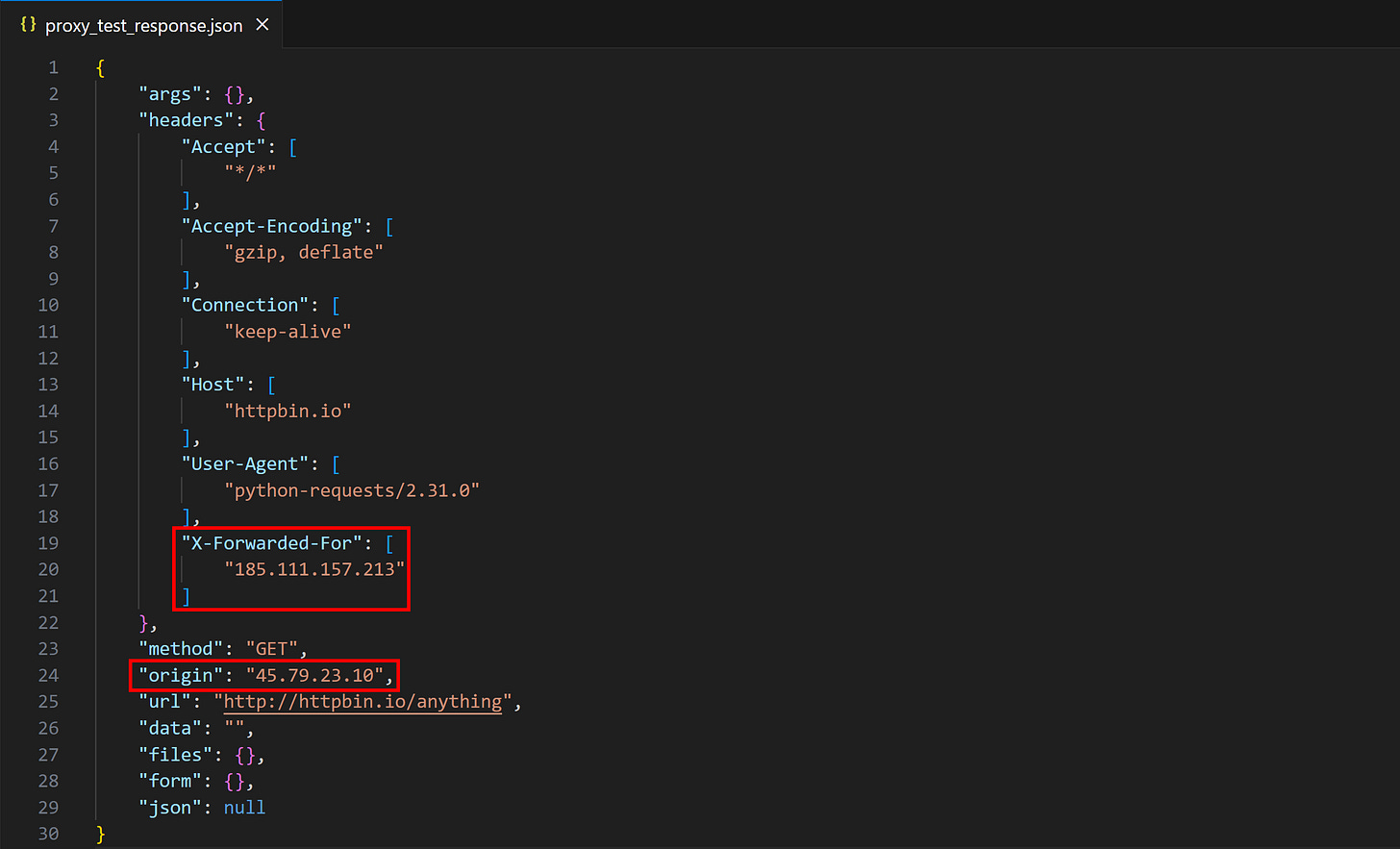
Run the script, and a file called *proxy\_test\_response.json* will appear in your project's directory. Open it, and you may see something like:
[](https://substackcdn.com/image/fetch/$s_!q5te!,f_auto,q_auto:good,fl_progressive:steep/https%3A%2F%2Fsubstack-post-media.s3.amazonaws.com%2Fpublic%2Fimages%2F4a8e5238-233d-4e88-b8c7-c579f09c4f01_2415x1465.png)
proxy\_test\_response.json with a transparent proxy
The *origin* field contains the proxy IP, which means the request was routed correctly through the proxy. However, notice how the response from the */anything* endpoint also has the *X-Forwarded-For* header. This was added by the proxy when routing the request to the target HttpBin server. That means your proxy server is actually transparent and doesn’t fully protect you!
---
[Need help with your scraping project?](https://substack.thewebscraping.club/p/consulting)
---
### **Testing an Elite Proxy**
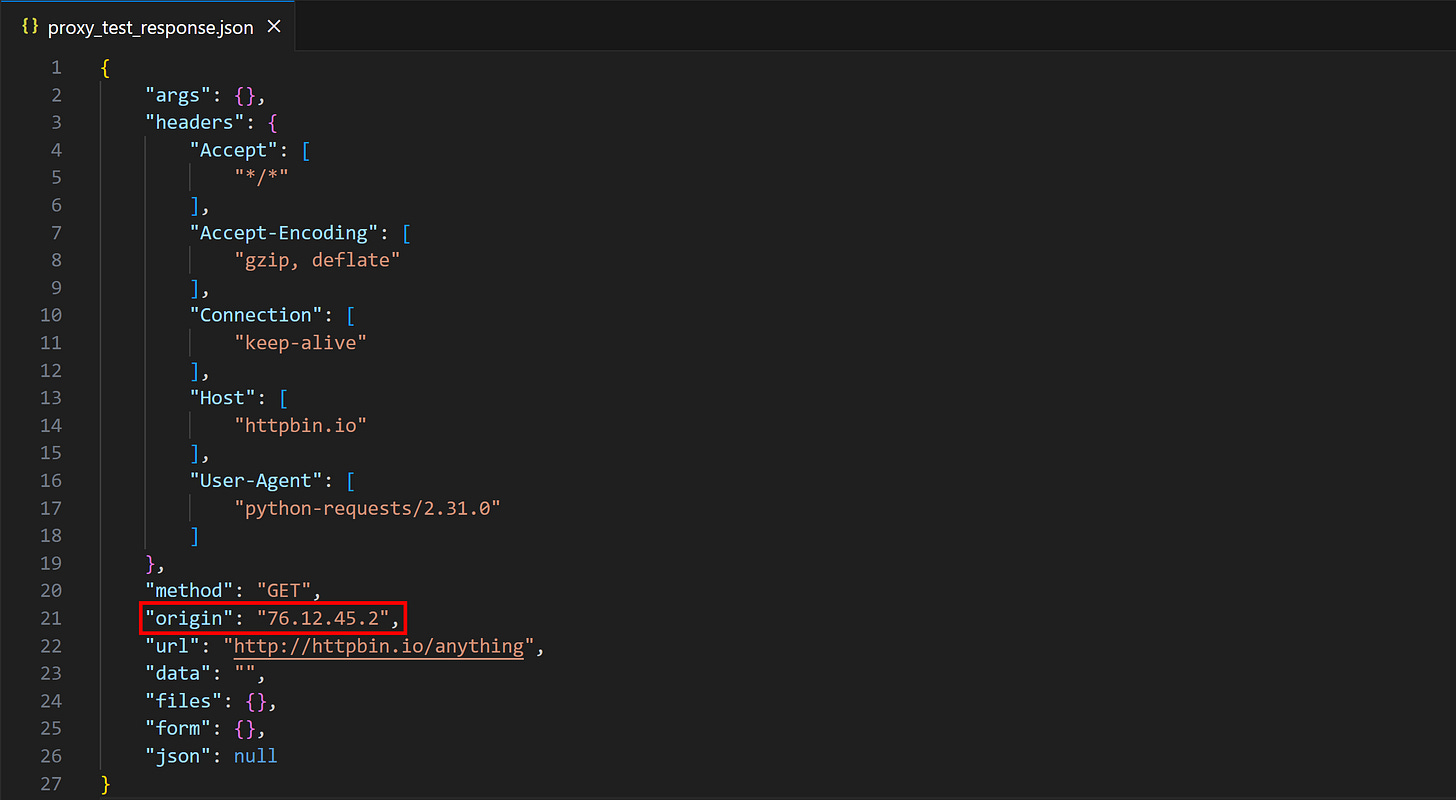
Get a premium proxy from [one of the trusted providers](https://proxyprice.thewebscraping.club/), then repeat the experiment. This time, the result will be:
[](https://substackcdn.com/image/fetch/$s_!EpO8!,f_auto,q_auto:good,fl_progressive:steep/https%3A%2F%2Fsubstack-post-media.s3.amazonaws.com%2Fpublic%2Fimages%2F0ba4c61d-d684-4f2c-a8ff-3a794bedf6c2_2410x1324.png)
proxy\_test\_response.json with an elite proxy
Notice how the *origin* field is different from before (and from the original Postman screenshot). This means your IP was successfully changed, and no *X-Forwarded-For*, *[Via](https://developer.mozilla.org/en-US/docs/Web/HTTP/Reference/Headers/Via),* or any other suspicious header was set. The server won’t be able to understand that the request originated from you—at least via [HTTP fingerprinting](https://lwthiker.com/networks/2022/06/17/http2-fingerprinting.html).
This is what elite anonymity feels like!
---
The Web Scraping Club is a reader-supported publication. To receive new posts and support my work, consider becoming a free or paid subscriber.
---
## Conclusion
The goal of this post was to explain the *X-Forwarded-For* header and the mechanism by which it is set. As you learned here, the proxy can contain information about the client IP. Thus, if your proxy adds it, that’s a problem for your anonymity!
Luckily, the simple solution is switching to a more reliable proxy provider that offers elite proxies, so you can be sure to avoid exposing your identity.
I hope you found this article helpful. Feel free to share your thoughts, questions, or experiences in the comments—until next time!
<!-- topic-links -->
**Topics:** [[Proxies]] | [[Human Behavior Emulation]] | [[Akamai]] | [[TLS Fingerprinting]]