In this first issue, we’ll test the [Bright Data Web Unblocker proxy](https://substack.com/redirect/665feab5-b291-4165-b41e-e9eb9528fdca?j=eyJ1IjoicGVuYXQifQ.8fGidy8O03qTquJJkc4Q8FNhyyHSzDFWpYnxqXSk5mg), an API that promises us we can scrape even the most difficult and protected websites.
## **What is Bright Data Web Unblocker**
Digging a bit more into Bright Data’s website we can understand better how this works. Directly from the product page:
> **Limits requests per IP**
>
> Manage IP usage rates so you don’t ask for a suspicious amount of data from any one IP
>
> **Emulates a real user**
>
> Automated user emulation including: starting on the target’s homepage, clicking their links, & making human mouse movements
>
> **Imitates the right devices**
>
> Web Unlocker emulates the right devices that servers expect to see
>
> **Calibrates referrer header**
>
> Makes sure the target website sees that you are landing on their page from a popular website
>
> **Identifies honeypots**
>
> Honeypots are links that sites use to expose your crawlers. Automatically detect them and avoid their trap
>
> **Sets intervals between requests**
>
> Automated delays are randomly set between requests
All these features can be summed up with the following picture.
[](https://substackcdn.com/image/fetch/$s_!ezpI!,f_auto,q_auto:good,fl_progressive:steep/https%3A%2F%2Fsubstack-post-media.s3.amazonaws.com%2Fpublic%2Fimages%2F13ce0da4-efd6-41b7-b5d6-05c13795bfe0_2508x1216.png)
[Bright Data Web Unblocker page](https://substack.com/redirect/665feab5-b291-4165-b41e-e9eb9528fdca?j=eyJ1IjoicGVuYXQifQ.8fGidy8O03qTquJJkc4Q8FNhyyHSzDFWpYnxqXSk5mg)
It seems a good solution and easy to integrate into our scrapers since it’s basically like adding a proxy to them.
## **Our testing methodology**
To test this kind of product I’ve developed a plain Scrapy spider that retrieves 10 pages from 5 different websites, one per each anti-bot solution tested (Datadome, Cloudflare, Kasada, F5, PerimeterX). It returns the HTTP status code, a string from the page (needed to check if the page was loaded correctly), the website, and the anti-bot names.
**The base scraper cannot retrieve correctly any of the records and this will be our benchmark result.**
As a result of the test, we’ll assign a score from 0 to 100, depending on how many URLs are retrieved correctly on two runs, one in a local environment and the other one from a server. A score of 100 means that the anti-bot was bypassed for every URL given in input in both tests, while our starting scraper has a score of 0 since it could not avoid an anti-bot for any of the records.
You can find the code of the test scraper in our GitHub repository open to all our readers.
## **Preparing for the test**
### **Create an account on Bright Data**
First of all, you need to create an account [on Bright Data’s website](https://substack.com/redirect/665feab5-b291-4165-b41e-e9eb9528fdca?j=eyJ1IjoicGVuYXQifQ.8fGidy8O03qTquJJkc4Q8FNhyyHSzDFWpYnxqXSk5mg). After you received the credentials, you need to set up a payment method and top up your account with some credits, in order to create a new proxy zone.
To do so, navigate to My proxies and select Web Unblocker.
[](https://substackcdn.com/image/fetch/$s_!NgKM!,f_auto,q_auto:good,fl_progressive:steep/https%3A%2F%2Fsubstack-post-media.s3.amazonaws.com%2Fpublic%2Fimages%2F3093756b-7209-40d1-bebf-4dbcf278f6b5_1640x1300.jpeg)
Bright Data Proxies
For our tests, after choosing the proxy name and setting up a password, we whitelisted the domains of the websites we were going to test.
[](https://substackcdn.com/image/fetch/$s_!_dtO!,f_auto,q_auto:good,fl_progressive:steep/https%3A%2F%2Fsubstack-post-media.s3.amazonaws.com%2Fpublic%2Fimages%2F064b562e-0a45-4277-8528-23fa319170e1_2292x1972.png)
Bright data our zone
In particular, we have whitelisted:
- [harrods.com](http://harrods.com/) for testing [Cloudflare](https://substack.com/redirect/4b63745b-2c3c-48c2-96c9-8814a144bacb?j=eyJ1IjoicGVuYXQifQ.8fGidy8O03qTquJJkc4Q8FNhyyHSzDFWpYnxqXSk5mg). At the moment, this website has one of the most strict policies I’ve seen between Cloudflare-protected websites.
- [neimanmarcus.com](http://neimanmarcus.com/) for testing [PerimeterX](https://substack.com/redirect/4d4265ef-1422-4411-a640-02eabd87e0d0?j=eyJ1IjoicGVuYXQifQ.8fGidy8O03qTquJJkc4Q8FNhyyHSzDFWpYnxqXSk5mg).
- [canadagoose.com](http://canadagoose.com/) for testing [Kasada](https://substack.com/redirect/b1253d00-1c14-4596-bf9f-b871f2d7e2fc?j=eyJ1IjoicGVuYXQifQ.8fGidy8O03qTquJJkc4Q8FNhyyHSzDFWpYnxqXSk5mg).
- [nordstrom.com](http://nordstrom.com/) for testing [F5](https://substack.com/redirect/c1921a52-19c3-4e06-bcf8-0b778a8dbc19?j=eyJ1IjoicGVuYXQifQ.8fGidy8O03qTquJJkc4Q8FNhyyHSzDFWpYnxqXSk5mg) (formerly known as Shape)
- [footlocker.it](http://footlocker.it/) for testing [Datadome](https://substack.com/redirect/28357808-ce8e-4ff9-bbdd-540025292fef?j=eyJ1IjoicGVuYXQifQ.8fGidy8O03qTquJJkc4Q8FNhyyHSzDFWpYnxqXSk5mg).
### **Setting up the Scrapy scraper**
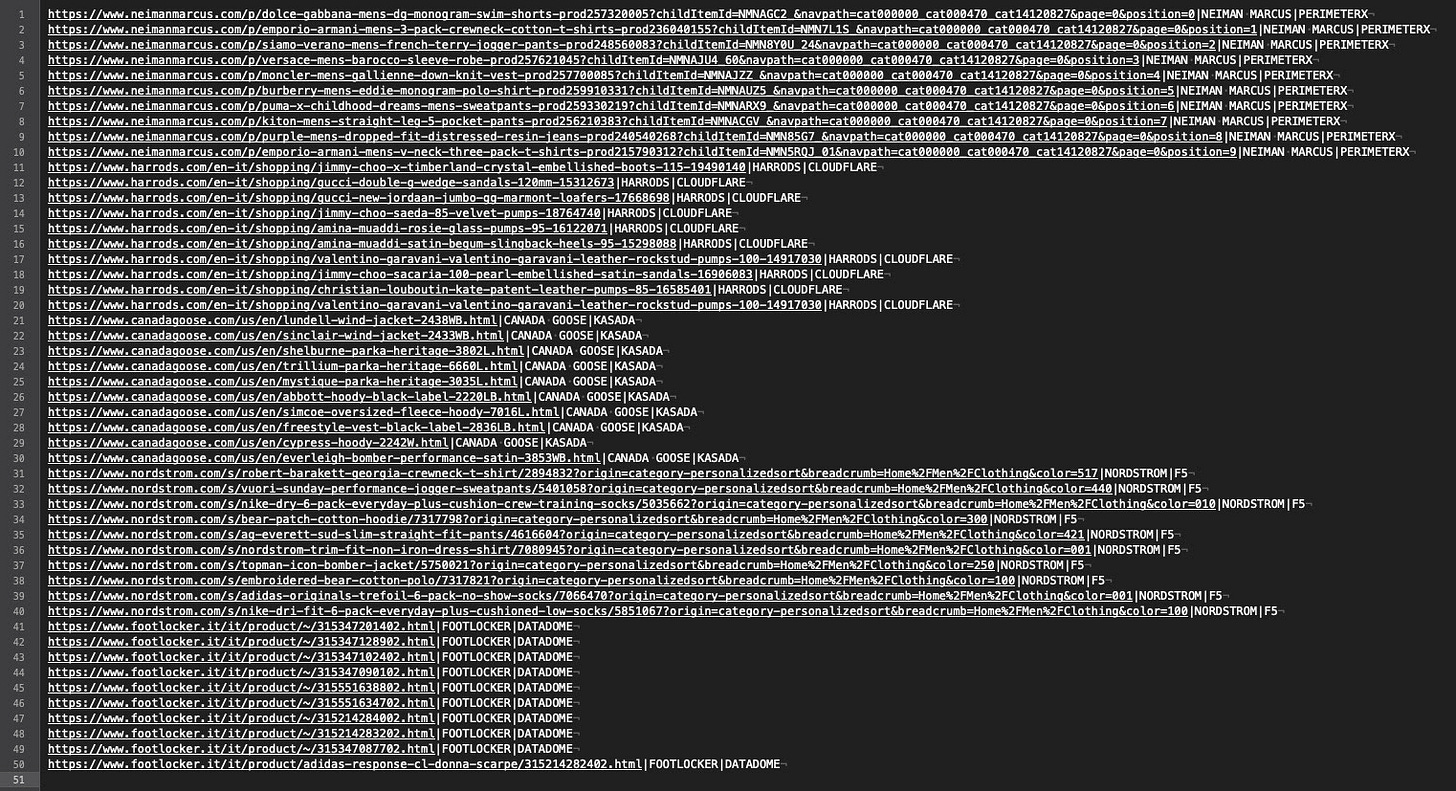
As said before, I’ve manually chosen fifty URLs, ten per website, as a benchmark and input for our Scrapy spider.
[](https://substackcdn.com/image/fetch/$s_!Dh9u!,f_auto,q_auto:good,fl_progressive:steep/https%3A%2F%2Fsubstack-post-media.s3.amazonaws.com%2Fpublic%2Fimages%2F964645b4-da7d-426e-a73d-53b553cb1055_1522x827.jpeg)
The scraper basically returns the Antibot and website names, given in input, the return code of the request, and a field populated with an Xpath selector, to be sure that we entered the product page and were not blocked by some challenge.
I’ve added to the scraper the [advanced-scrapy-proxies](https://substack.com/redirect/b9ac4be8-27ba-49c8-977a-5811d0a12ecd?j=eyJ1IjoicGVuYXQifQ.8fGidy8O03qTquJJkc4Q8FNhyyHSzDFWpYnxqXSk5mg) package, which is my version of the random scrapy proxy package with some more features.
You can find anyway the full code of the scraper on the [free GitHub repository of The Web Scraping Club](https://substack.com/redirect/0dde667d-86d8-43b0-b45f-9905de1eae44?j=eyJ1IjoicGVuYXQifQ.8fGidy8O03qTquJJkc4Q8FNhyyHSzDFWpYnxqXSk5mg).
**[Free GitHub Repository](https://substack.com/redirect/0dde667d-86d8-43b0-b45f-9905de1eae44?j=eyJ1IjoicGVuYXQifQ.8fGidy8O03qTquJJkc4Q8FNhyyHSzDFWpYnxqXSk5mg)**
## **First run: no Web Unblocker on local environment**
After disabling the proxy management from the setting.py file in the scraper, I started a first run where I expect the failure for all the requests.
[](https://substackcdn.com/image/fetch/$s_!-i-A!,f_auto,q_auto:good,fl_progressive:steep/https%3A%2F%2Fsubstack-post-media.s3.amazonaws.com%2Fpublic%2Fimages%2Fb1b1093d-644a-4328-bcae-fc21e18ba71c_645x82.png)
No proxy setup
PROXY\_MODE = -1 in the [advanced-scrapy-proxies](https://substack.com/redirect/b9ac4be8-27ba-49c8-977a-5811d0a12ecd?j=eyJ1IjoicGVuYXQifQ.8fGidy8O03qTquJJkc4Q8FNhyyHSzDFWpYnxqXSk5mg) package means that the scraper runs without proxy.
The results after the first run are the following.
[](https://substackcdn.com/image/fetch/$s_!qRlN!,f_auto,q_auto:good,fl_progressive:steep/https%3A%2F%2Fsubstack-post-media.s3.amazonaws.com%2Fpublic%2Fimages%2F6a37e51e-dc6b-4986-9032-beaf96626723_1342x1608.png)
First run results
Basically, every website returned errors except Nordstrom, which returned the code 200 but without showing the product we asked.
## **Second run: using the Web Unblocker**
Now let’s activate the Web Unblocker and see what happens.
[](https://substackcdn.com/image/fetch/$s_!iH5R!,f_auto,q_auto:good,fl_progressive:steep/https%3A%2F%2Fsubstack-post-media.s3.amazonaws.com%2Fpublic%2Fimages%2Fab925aa7-7e54-4466-89c0-ae248bdfd2e5_609x78.png)
With Bright Data Web Unblocker
Here are the results.
[](https://substackcdn.com/image/fetch/$s_!SMOu!,f_auto,q_auto:good,fl_progressive:steep/https%3A%2F%2Fsubstack-post-media.s3.amazonaws.com%2Fpublic%2Fimages%2Fb83a0edd-6529-4e05-aca8-23ade0cd4f82_1706x1584.png)
Bright Data Web Unblocker results
There’s a significant improvement in success rate, with only four records not returned from Nordstrom. But also, in these cases, running again the scraper allows retrieving also these records so we can say that the challenge is passed. Without any headful solution like Playwright or Selenium, we were able to bypass the most common anti-bot softwares.
## **Third run: using the Web Unblocker**
Let’s use the same settings but this time we’re going to run the scraper from a virtual machine in a cloud environment. We’re running this third test to understand if the device fingerprint of a server is going to be leaked to the target websites.
[](https://substackcdn.com/image/fetch/$s_!iH5R!,f_auto,q_auto:good,fl_progressive:steep/https%3A%2F%2Fsubstack-post-media.s3.amazonaws.com%2Fpublic%2Fimages%2Fab925aa7-7e54-4466-89c0-ae248bdfd2e5_609x78.png)
With Bright Data Web Unblocker
Here are the results, pretty similar to the ones we got in a local environment.
[](https://substackcdn.com/image/fetch/$s_!_AjT!,f_auto,q_auto:good,fl_progressive:steep/https%3A%2F%2Fsubstack-post-media.s3.amazonaws.com%2Fpublic%2Fimages%2F8978756e-824b-4f49-81da-45b35afeaa3e_1324x1596.png)
Again we have some 502 codes on F5 and on Kasada, for a total of 8 out of 50 results. Probably they can be fixed with a second try as the Web Unblocker can bypass other records of the same solution.
## **Final remarks**
I need to be honest, the Bright Data’s Web Unblocker surprised me in a positive way. I already tried it some years ago and was unimpressed but now I have to admit it solves many headaches.
### **Pros**
- Easy implementation in any scraper
- Solves most of the anti-bot challenges and solutions (at least from what I’ve seen from this small test)
### **Cons**
- Pricing per GB is quite expensive (but on the same level as comparable solutions from their competitors), and this makes it unusable for low-budget/large-scope projects. This can be mitigated using the CPM (units of 1,000 requests) charging where you get billed only for successful requests and not for failed ones.
### **Rating**
Since the Bright Data Web Unblocker solved 46 out of 50 URLs in the first run, and 42 out of 50 in the second one, **its final score is 88/100.**
<!-- topic-links -->
**Topics:** [[Proxies]] | [[Cloudflare]] | [[DataDome]] | [[Browser Automation]]