회사에서는 현재 전역 상태 관리 도구로 `Zustand`를 사용하고 있다. 프로젝트를 진행하다 보면 왜 여기서 `store`를 사용했지? 하는 의문을 가지게 되는 경우가 많다. 개인적으로 리액트 앱에서 전역 스토어가 필요한 경우가 극히 드물다고 생각한다.
## Store 보다 Context API를 선호하는 이유
나는 **대부분의 경우 Context API가 Zustand보다 적합하다**고 생각한다. [이 글](https://velog.io/@koreanthuglife/React%EC%9D%98-Context-API-%EB%9C%AF%EC%96%B4%EB%B3%B4%EA%B8%B0#%EA%B2%B0%EB%A1%A0)에서 말한 것 처럼 나는 Context API를 **의존성 주입 도구**라고 생각한다.
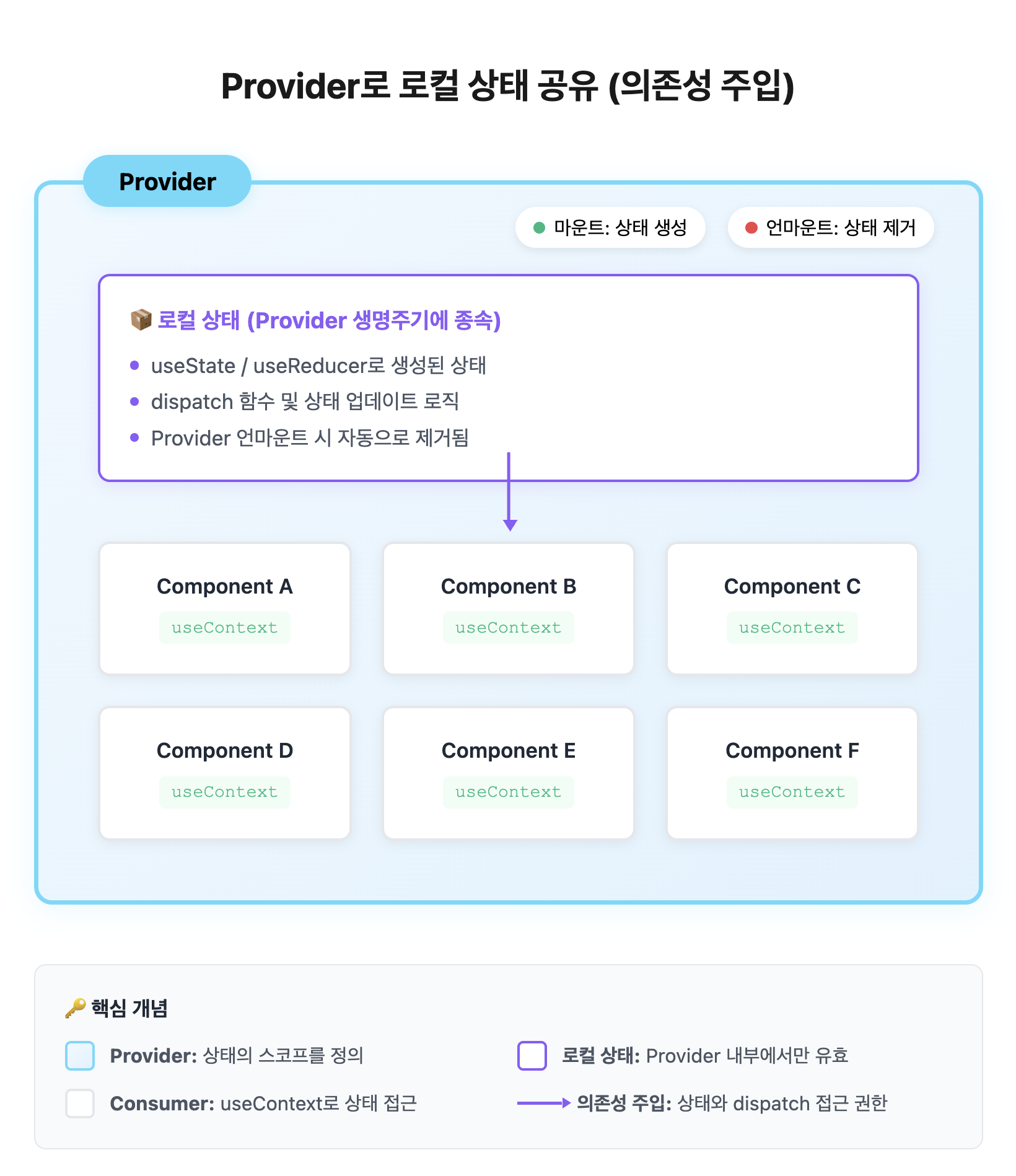
Context API를 사용해 만들고 공유하는 상태는 전역 상태를 만드는게 아닌, Provider에서 생성한 "지역 상태" 및 dispatch 함수에 접근할 수 있는 의존성을 주입한다.
그래서 Context API를 이용한 전역상태를 Provider의 마운트 시점에 생성되고 언마운트 시점에 제거되는 **"지역 상태"**를 읽고 쓸 수 있는 의존성을 주입하는것 이라고 생각한다.
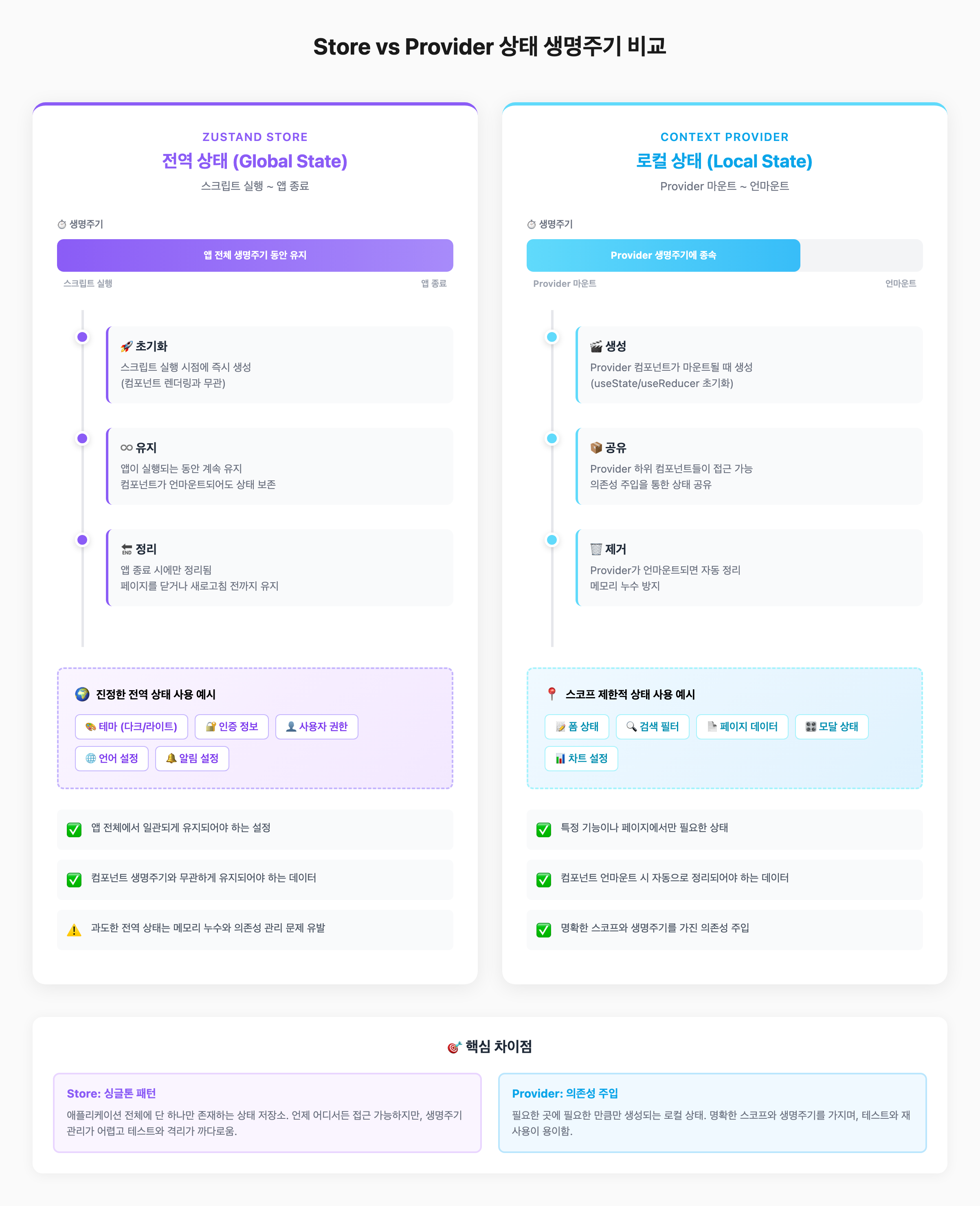
스토어는 모듈이 처음 import될 때 초기화 되고, 앱 종료 이전까지 정리되지 않는 **"진짜 전역" 상태**다. 개인적으론 이런 "진짜 전역" 상태가 뭐가 있을까... 하고 떠올려 보면 테마, 권한 정도 밖에 생각나지 않는거 같다. 물론 내가 경험이 부족해 그럴거라고 생각한다.
## 그럼에도 불구하고 스토어를 사용하게 되는 경우
그럼에도 불구하고 스토어를 사용하는 경우도 분명 있다. Context API를 사용하면 반드시 직면하는 **불필요한 리렌더링 문제**를 피하기 위해서다.
이론적으로는 Context를 아토믹하게 설계하면 해결 가능하지만, **실무에서는 상태 간 의존성이 복잡해서 쉽지 않다.**
**대시보드**를 예제로 생각해보자. 실시간 모니터링 데이터와 사용자별 설정을 함께 관리하는 대시보드가 있다고 가정하자.
```tsx
interface DashboardState {
// 모니터링 데이터 (실시간으로 자주 업데이트)
cpuUsage: number;
memoryUsage: number;
networkTraffic: number[];
errorLogs: string[];
activeUsers: number;
lastUpdated: Date;
// 사용자 설정 (초기 로드 후 가끔 변경)
userId: string;
dashboardLayout: 'grid' | 'list';
preferences: {
theme: 'light' | 'dark';
refreshInterval: number;
};
}
const DashboardContext = createContext<{
state: DashboardState;
updateCpuUsage: (value: number) => void;
updateMemoryUsage: (value: number) => void;
updatePreferences: (prefs: Preferences) => void;
// ... 더 많은 update 함수들
}>(null);
```
위 같은 데이터를 Context API로 공유하게 되면 아래처럼 `CPU` 데이터에만 관심있는 컴포넌트도 컨텍스트를 구독했기 때문에 **다른 데이터(메모리, 설정 등)가 변경되면 불필요하게 리렌더링** 되게 된다.
```tsx
function CpuWidget() {
const { state } = useContext(DashboardContext);
return <div>CPU: {state.cpuUsage}%</div>;
}
// memoryUsage가 변경되거나 preferences.theme이 변경되어도
// CpuWidget이 리렌더링된다
```
물론 이를 Context를 더 잘게 쪼개 해결할 수 있다.
```tsx
interface CpuContextType { ... }
interface MemoryContextType { ... }
interface NetworkContextType { ... }
interface UserPreferencesContextType { ... }
// ... (총 8개 이상의 Context로 분리 필요)
```
하지만 이렇게 쪼개는 것은 실무에서 매우 번거롭고, 상태 간 의존성이 있을 경우 더 복잡해진다.
이런 경우 스토어를 사용한다면 훨씬 간단하게 상태를 다룰 수 있고, **선택적 구독**으로 최적화할 수 있다.
```tsx
// store.ts
interface DashboardStore {
// 모니터링 데이터
cpuUsage: number;
memoryUsage: number;
networkTraffic: number[];
errorLogs: string[];
activeUsers: number;
lastUpdated: Date;
// 사용자 설정
userId: string;
dashboardLayout: 'grid' | 'list';
preferences: {
theme: 'light' | 'dark';
refreshInterval: number;
};
// 액션들
updateCpuUsage: (value: number) => void;
updateMemoryUsage: (value: number) => void;
updatePreferences: (prefs: Partial<Preferences>) => void;
initializeStore: (userId: string) => Promise<void>;
// ... 더 많은 update 함수들
}
const useDashboardStore = create<DashboardStore>((set) => ({
// 모니터링 데이터
cpuUsage: 0,
memoryUsage: 0,
networkTraffic: [],
errorLogs: [],
activeUsers: 0,
lastUpdated: new Date(),
// 사용자 설정
userId: '',
dashboardLayout: 'grid',
preferences: {
theme: 'light',
refreshInterval: 5000,
},
// 액션 구현
updateCpuUsage: (value) => set({ cpuUsage: value }),
updateMemoryUsage: (value) => set({ memoryUsage: value }),
updatePreferences: (prefs) =>
set((state) => ({ preferences: { ...state.preferences, ...prefs } })),
initializeStore: async (userId: string) => {
const userSettings = await fetchUserDashboardSettings(userId);
set({
userId,
dashboardLayout: userSettings.layout,
preferences: userSettings.preferences,
});
},
// ... 나머지 update 함수들
}));
function CpuWidget() {
// cpuUsage만 구독 → memoryUsage, preferences 변경 시 리렌더링 안됨
const cpuUsage = useDashboardStore(state => state.cpuUsage);
return <div>CPU: {cpuUsage}%</div>;
}
function SystemHealthWidget() {
// cpuUsage와 memoryUsage만 구독
const isHealthy = useDashboardStore(
state => state.cpuUsage < 80 && state.memoryUsage < 80
);
return <div>Status: {isHealthy ? 'OK' : 'Warning'}</div>;
}
function ThemeToggle() {
// theme만 구독 → 모니터링 데이터 변경 시 리렌더링 안됨
const theme = useDashboardStore(state => state.preferences.theme);
const updatePreferences = useDashboardStore(state => state.updatePreferences);
return (
<button onClick={() => updatePreferences({
theme: theme === 'light' ? 'dark' : 'light'
})}>
Toggle Theme
</button>
);
}
```
이처럼 Zustand는 **선택적 구독**을 통해 필요한 상태만 선택할 수 있어, Context를 여러 개로 쪼개지 않아도 리렌더링을 효과적으로 방지할 수 있다.
## 스토어의 문제점
이처럼 스토어는 복잡한 상태를 관리할 때 발생하는 문제점을 해결할 수 있는 좋은 도구다. 다만 내가 생각하는 스토어의 큰 문제점이 3가지 정도 있다.
1. **동적 초기화가 불가능하다.**
2. 1번 경우로 인해 **"아무 의미 없는 값(Default)"을 기반으로 초기 렌더링이 발생**한다.
3. 스크립트 실행 시점에 생성되고 사라지지 않는, 리액트와 별개로 존재하는 **"완전한" 전역 상태**다. 어디서나 수정될 수 있고, Context API 처럼 내가 원하는 시점에 초기화 하고 제거할 수 없다.
하나하나 예시를 토대로 알아보자.
### 1. 동적 초기화가 불가능하다.
보통 리액트 앱에서 아래처럼 스토어를 생성한다.
```tsx
const useDashboardStore = create<DashboardStore>((set) => ({
userId: '',
dashboardLayout: 'default',
widgets: [],
preferences: {
theme: 'light',
refreshInterval: 5000,
},
initializeStore: async (userId: string) => {
const userSettings = await fetchUserDashboardSettings(userId);
set({
userId,
dashboardLayout: userSettings.layout,
widgets: userSettings.widgets,
preferences: userSettings.preferences,
});
},
}));
```
이 스토어는 **모듈 import 시점**에 초기화된다. 따라서 `userId` 같은 **런타임에 결정되는 값**을 주입할 수 없고, 아래처럼 `useEffect`에서 별도로 초기화해야 한다.
```tsx
function Dashboard({ userId }: { userId: string }) {
const { initializeStore, widgets } = useDashboardStore();
useEffect(() => {
initializeStore(userId);
}, [userId]);
return <div>{/* 실제 대시보드 */}</div>;
}
```
이처럼 스토어에 초기값을 할당하기 위한 불필요한 리렌더링이 발생하게 된다. 하지만 내가 생각하는 진짜 큰 문제는 바로 "의미 없는 디폴트 값"을 가지고 렌더링 하게된다는 것이다.
### 2. "아무 의미 없는 값(Default)"을 기반으로 초기 렌더링이 발생한다.
대시보드 스토어 예시를 다시 보자.
```tsx
const useDashboardStore = create<DashboardStore>((set) => ({
// userId를 알 수 없어서 기본값으로 초기화해야 함
userId: '', // 의미없는 기본값
dashboardLayout: 'default', // 실제 사용자 설정과 다를 수 있음
widgets: [], // 빈 배열로 시작
preferences: {
theme: 'light', // 사용자의 실제 테마 설정을 모름
refreshInterval: 5000, // 임의의 기본값
},
initializeStore: async (userId: string) => {
const userSettings = await fetchUserDashboardSettings(userId);
set({
userId,
dashboardLayout: userSettings.layout,
widgets: userSettings.widgets,
preferences: userSettings.preferences,
});
},
}));
```
이처럼 그냥 아무 의미 없는 값을 가지고 초기 렌더링을 발생시켜야 한다.
> **실제 겪었던 버그**
> 하위 컴포넌트에서 `userId`로 API 요청을 보낼 때,
> 빈 문자열 `''`이 전달되어 `400 Bad Request` 에러 발생
### 3. 스토어는 **React 컴포넌트 생명주기와 무관하게** 영구적으로 존재한다.
스토어는 리액트 컴포넌트 라이프사이클과 독립적으로 존재하는 "완전한" 전역 상태다. 이게 왜 문제일까?
앞서 본 `useDashboardStore`에는 사용자별 필터 설정도 포함되어 있다고 가정해보자.
```tsx
const useDashboardStore = create<DashboardStore>((set) => ({
// 모니터링 데이터
cpuUsage: 0,
memoryUsage: 0,
networkTraffic: [],
// 사용자 설정
userId: '',
preferences: { theme: 'light', refreshInterval: 5000 },
// 필터 설정 (사용자가 대시보드에서 선택한 옵션들)
filters: {
dateRange: { start: new Date(), end: new Date() },
selectedMetrics: [],
viewMode: 'grid',
},
// 액션들
updateFilters: (filters) => set({ filters }),
resetFilters: () => set({
filters: {
dateRange: { start: new Date(), end: new Date() },
selectedMetrics: [],
viewMode: 'grid',
}
}),
// ...
}));
```
이 스토어를 `DashboardPage`에서 사용할 때, 페이지 진입/이탈 시마다 **수동으로 초기화**해야 한다.
```tsx
function DashboardPage({ dashboardId }: { dashboardId: string }) {
const { filters, resetFilters } = useDashboardStore();
useEffect(() => {
resetFilters(); // 👈 진입 시 초기화
return () => {
resetFilters(); // 👈 이탈 시도 초기화 (깜빡하기 쉬움)
};
}, [dashboardId]);
return (
<div>
<h1>Dashboard: {dashboardId}</h1>
<DateRangePicker value={filters.dateRange} />
<MetricSelector selected={filters.selectedMetrics} />
<ViewModeToggle mode={filters.viewMode} />
{/* 실제 대시보드 위젯들 */}
</div>
);
}
```
여기서만 초기화하면 될까? **아니다.** 사용자가 다른 프로젝트로 전환하거나, 로그아웃할 때도 초기화해야 한다.
```tsx
function ProjectSwitcher() {
const handleProjectChange = (projectId: string) => {
switchProject(projectId);
// ⚠️ 개발자가 초기화를 깜빡했다면?
// useDashboardStore.getState().resetFilters();
// → 이전 프로젝트의 필터 설정이 그대로 적용됨
};
}
function LogoutButton() {
const handleLogout = () => {
logout();
// ⚠️ 여기서도 초기화를 빼먹으면?
// useDashboardStore.getState().resetFilters();
// → 다음 사용자가 로그인했을 때 이전 사용자의 설정이 보임
};
}
```
> **실제 발생 가능한 버그 시나리오**
>
> 1. 사용자 A가 대시보드에서 필터 설정 (`dateRange: 2024-01-01 ~ 2024-12-31`)
> 2. 로그아웃 시 `resetFilters()` 호출 누락
> 3. 사용자 B가 로그인
> 4. **사용자 A의 필터 설정이 그대로 보임**
이처럼 전역 스토어는 **개발자가 명시적으로 정리하지 않으면 영구적으로 남아있어**, 여러 곳에서 초기화 로직을 빼먹기 쉽고 버그로 이어진다.
## 스토어 지역화가 해결해주는 문제
물론 `initialized` 플래그를 두거나 하위 컴포넌트에서 처리할 수도 있다. 하지만 나는 **스토어를 Provider 마운트 시점에 초기화하고, 언마운트 시 자동으로 정리**되게 만들고 싶었다.
스토어를 지역화하면 앞서 언급한 3가지 문제가 모두 해결된다:
> **동적 초기화** - Provider props로 `userId`, `preferences` 등 런타임 데이터 주입
> **의미 있는 초기 렌더** - 더미 값 없이 실제 데이터로 첫 렌더링
> **자동 생명주기 관리** - Provider 언마운트 시 스토어도 함께 정리
스토어를 어떻게 지역화할 수 있는지 차근차근 살펴보자.
### 1. 스토어를 생성하는 팩토리 함수
```tsx
interface DashboardStoreInitial {
userId: string;
preferences?: {
theme: 'light' | 'dark';
refreshInterval: number;
};
// 모니터링 데이터는 선택적
cpuUsage?: number;
memoryUsage?: number;
}
const createDashboardStore = (initialData: DashboardStoreInitial) => {
return createStore<DashboardStore>((set) => ({
// 모니터링 데이터
cpuUsage: initialData.cpuUsage ?? 0,
memoryUsage: initialData.memoryUsage ?? 0,
networkTraffic: [],
errorLogs: [],
activeUsers: 0,
lastUpdated: new Date(),
// 사용자 설정 - 런타임 데이터로 초기화
userId: initialData.userId, // ✅ 더미 값 없음
dashboardLayout: 'grid',
preferences: initialData.preferences ?? {
theme: 'light',
refreshInterval: 5000,
},
// 필터 설정
filters: {
dateRange: { start: new Date(), end: new Date() },
selectedMetrics: [],
viewMode: 'grid',
},
// 액션들
updateCpuUsage: (value) => set({ cpuUsage: value }),
updateMemoryUsage: (value) => set({ memoryUsage: value }),
updatePreferences: (prefs) =>
set((state) => ({ preferences: { ...state.preferences, ...prefs } })),
resetFilters: () => set({
filters: {
dateRange: { start: new Date(), end: new Date() },
selectedMetrics: [],
viewMode: 'grid',
}
}),
// ...
}));
};
```
### 2. Provider에서 마운트 시점에 스토어 생성
```tsx
const DashboardStoreContext = createContext<StoreApi<DashboardStore> | null>(null);
export function DashboardStoreProvider({
children,
userId,
preferences,
}: {
children: ReactNode;
userId: string; // 런타임에 결정되는 값을 props로 받음
preferences?: Preferences;
}) {
// Provider 마운트 시점에 실제 데이터로 스토어 생성
const storeRef = useRef<StoreApi<DashboardStore>>();
if (!storeRef.current) {
storeRef.current = createDashboardStore({ userId, preferences });
}
return (
<DashboardStoreContext.Provider value={storeRef.current}>
{children}
</DashboardStoreContext.Provider>
);
}
// Hook으로 스토어 사용
export const useDashboardStore = <T,>(
selector: (state: DashboardStore) => T
): T => {
const store = useContext(DashboardStoreContext);
if (!store) throw new Error('DashboardStoreProvider not found');
return useStore(store, selector);
};
```
### 3. Provider로 감싸서 사용
```tsx
function App() {
const { userId, preferences } = useAuth(); // 로그인한 사용자 정보
return (
<DashboardStoreProvider
userId={userId} // 런타임 데이터 주입
preferences={preferences}
>
<DashboardPage />
</DashboardStoreProvider>
);
}
function DashboardPage() {
// 더미 값 없이 실제 userId로 첫 렌더링
const userId = useDashboardStore(state => state.userId);
const cpuUsage = useDashboardStore(state => state.cpuUsage);
const updateCpuUsage = useDashboardStore(state => state.updateCpuUsage);
// useEffect로 초기화할 필요 없음
// cleanup에서 resetFilters 호출할 필요 없음 (Provider 언마운트 시 자동 정리)
return (
<div>
<h1>Dashboard for {userId}</h1>
<p>CPU: {cpuUsage}%</p>
<button onClick={() => updateCpuUsage(Math.random() * 100)}>
Update
</button>
</div>
);
}
```
### 무엇이 달라졌나?
| 문제 | 전역 스토어 | 지역화된 스토어 |
|------|------------|----------------|
| **초기화** | `useEffect`에서 `initializeStore()` 호출 필요 | Provider props로 즉시 초기화 |
| **첫 렌더링** | `userId: ''` 같은 더미 값 | 실제 `userId` 값 |
| **정리** | 여러 곳에서 `resetFilters()` 수동 호출 | Provider 언마운트 시 자동 정리 |
이렇게 스토어 팩토리 + Context 패턴으로 **Context의 생명주기 관리**와 **Zustand의 선택적 구독** 장점을 모두 가진 상태 관리를 할 수 있다.
## 그런데 문제는?
나는 대부분의 경우 이런 패턴으로 스토어를 사용한다. 다만 이게 무조건 좋다고 생각하지는 않는다. 다양한 문제점들이 있다고 생각한다. 내가 느낀 이 패턴의 **가장 큰 문제는 보일러플레이트**다. 매번 Context 생성, Provider 래핑, 커스텀 훅 작성... 반복 작업이 너무 많다.
최근 이 보일러 플레이트 문제를 해결하기 위한 작업을 진행했고, 마지막으로 이에 대한 내용을 공유하며 글을 마무리 하려 한다.
## 보일러플레이트 문제 해결하기
앞서 본 DashboardStore 패턴은 매번 Context, Provider, 커스텀 훅을 작성해야 해서 보일러플레이트가 많다. 이를 간단한 모니터링 스토어로 보면 이렇다.
**변경 전**
```tsx
import { createContext, useContext, useRef } from 'react';
import { createStore, StoreApi, useStore } from 'zustand';
interface MonitoringState {
cpuUsage: number;
memoryUsage: number;
updateCpuUsage: (value: number) => void;
updateMemoryUsage: (value: number) => void;
}
const createMonitoringStore = (initial?: { cpuUsage?: number; memoryUsage?: number }) => {
return createStore<MonitoringState>((set) => ({
cpuUsage: initial?.cpuUsage ?? 0,
memoryUsage: initial?.memoryUsage ?? 0,
updateCpuUsage: (value) => set({ cpuUsage: value }),
updateMemoryUsage: (value) => set({ memoryUsage: value }),
}));
};
const MonitoringContext = createContext<StoreApi<MonitoringState> | null>(null);
interface MonitoringProviderProps {
children: React.ReactNode;
initialData?: { cpuUsage?: number; memoryUsage?: number };
}
export const MonitoringProvider = ({
children,
initialData
}: MonitoringProviderProps) => {
const storeRef = useRef<StoreApi<MonitoringState>>();
if (!storeRef.current) {
storeRef.current = createMonitoringStore(initialData);
}
return (
<MonitoringContext.Provider value={storeRef.current}>
{children}
</MonitoringContext.Provider>
);
};
export const useMonitoring = <T,>(
selector: (state: MonitoringState) => T
): T => {
const store = useContext(MonitoringContext);
if (!store) {
throw new Error('Missing MonitoringContext.Provider in the tree');
}
return useStore(store, selector);
};
```
**변경 후**
```tsx
import { createSimpleStore } from '@/shared/react/storeFactory';
interface MonitoringState {
cpuUsage: number;
memoryUsage: number;
updateCpuUsage: (value: number) => void;
updateMemoryUsage: (value: number) => void;
}
const monitoringStore = createSimpleStore<MonitoringState>(
'Monitoring',
(set, initialData) => ({
cpuUsage: initialData?.cpuUsage ?? 0,
memoryUsage: initialData?.memoryUsage ?? 0,
updateCpuUsage: (value) => set({ cpuUsage: value }),
updateMemoryUsage: (value) => set({ memoryUsage: value }),
}),
);
export const MonitoringProvider = monitoringStore.Provider;
export const useMonitoring = monitoringStore.useStore;
```
**70% 코드 감소** - 이제 누구나 쉽게 지역화된 스토어 패턴을 적용할 수 있다. `createSimpleStore` 유틸리티의 내부 구현은 별도 깃허브 레포에 작성해두었다.
> 참고: https://github.com/gihwan-dev/store-factory
## 결론
이 패턴을 얘기할 때 가장 많이 듣는 얘기는 **굳이 그렇게 써야하나?** 이다. 개인적으로 Context API를 가장 많이 사용한다. 다만 Context API가 아닌 스토어를 써야겠다는 생각이 드는 경우가 있다.
1. 리렌더링 문제가 예상될 때
2. 복잡한 상태를 가져 Context API를 잘게 설계하기 부담스러울 때
그럴때, 그러니까... 스토어를 써야한다고 판단될 때 그럴때 이러한 패턴을 사용한다. 이 패턴을 강조하는 가장 큰 이유는, 굳이 스토어를 쓸 필요가 없는데 사용되는 케이스를 너무 많이 봤기 때문이다.
이 스토어 사용으로 인한 사이드 이펙트가 버그를 발생 시키는 문제를 너무나도 많이 봤고, 대부분의 경우 스토어의 지역화로 해결되었다.
사실 이게 좋은 패턴인지 뭔지 잘 모르겠다. 다만 짧은 경험에서 이 패턴이 가져다주는 장점이 아직은 내게 너무 매력적이라 적극 활용하고 있다.
[이 글](https://tkdodo.eu/blog/zustand-and-react-context)을 읽어 보는 것도 왜 이 패턴을 굳이 쓰는지에 대해 이해하는데 도움이 될거라 생각한다.